A lead arrives.Someone types it in.
We route every new inquiry into your CRM, assign it and start the follow-up. Staff step in only when something looks off.

We build and manage automations that connect the systems your business already uses, so your team spends less time copying, chasing and reporting.
That is the work we take off your team’s plate. We connect the tools you already use, add AI only where judgment is needed, and keep it all running after launch.
Four examples belowWe route every new inquiry into your CRM, assign it and start the follow-up. Staff step in only when something looks off.
Staff photograph the damage at the dock. The photos, the purchase order and the carrier details are filed together, and a claim is drafted for a person to check and send.


An assistant looks across your policies, files and records, answers with the source attached, and hands anything unusual to your team.

The numbers are pulled from the same places every week, assembled the same way, and waiting in the inbox before anyone asks.

We route every new inquiry into your CRM, assign it and start the follow-up. Staff step in only when something looks off.
Staff photograph the damage at the dock. The photos, the purchase order and the carrier details are filed together, and a claim is drafted for a person to check and send.
An assistant looks across your policies, files and records, answers with the source attached, and hands anything unusual to your team.
The numbers are pulled from the same places every week, assembled the same way, and waiting in the inbox before anyone asks.
Start with the one that costs your team the most hours. Workflow automation is usually the best first step; add the rest as you need it.
We connect the systems your team already uses and automate the repetitive handoffs between them, from lead intake and follow-up to reporting, document processing and approvals. AI is used only where judgment or messy information makes fixed rules fall short; predictable steps stay ordinary automation.
Book an auditWe automate the gaps between your tools, and build custom software only where the existing ones genuinely fall short. You do not have to replace what works.

One workflow at a time. Each step ends with something written down, so you always know what you are paying for and what happens next.
A free 30-minute call. You describe the job you want off your team’s plate. We ask how often it happens, which tools it touches and where it goes wrong.
We write down every step, system and exception, check the technical side, and give you a fixed written scope.
One narrow workflow, built and tested against your real examples, with a person in the loop while it proves itself.
It goes live with training and a written guide for your team, and we watch it closely for the first 30 days.
Monitoring, repairs when connected software changes, and a quarterly look at what to automate next.
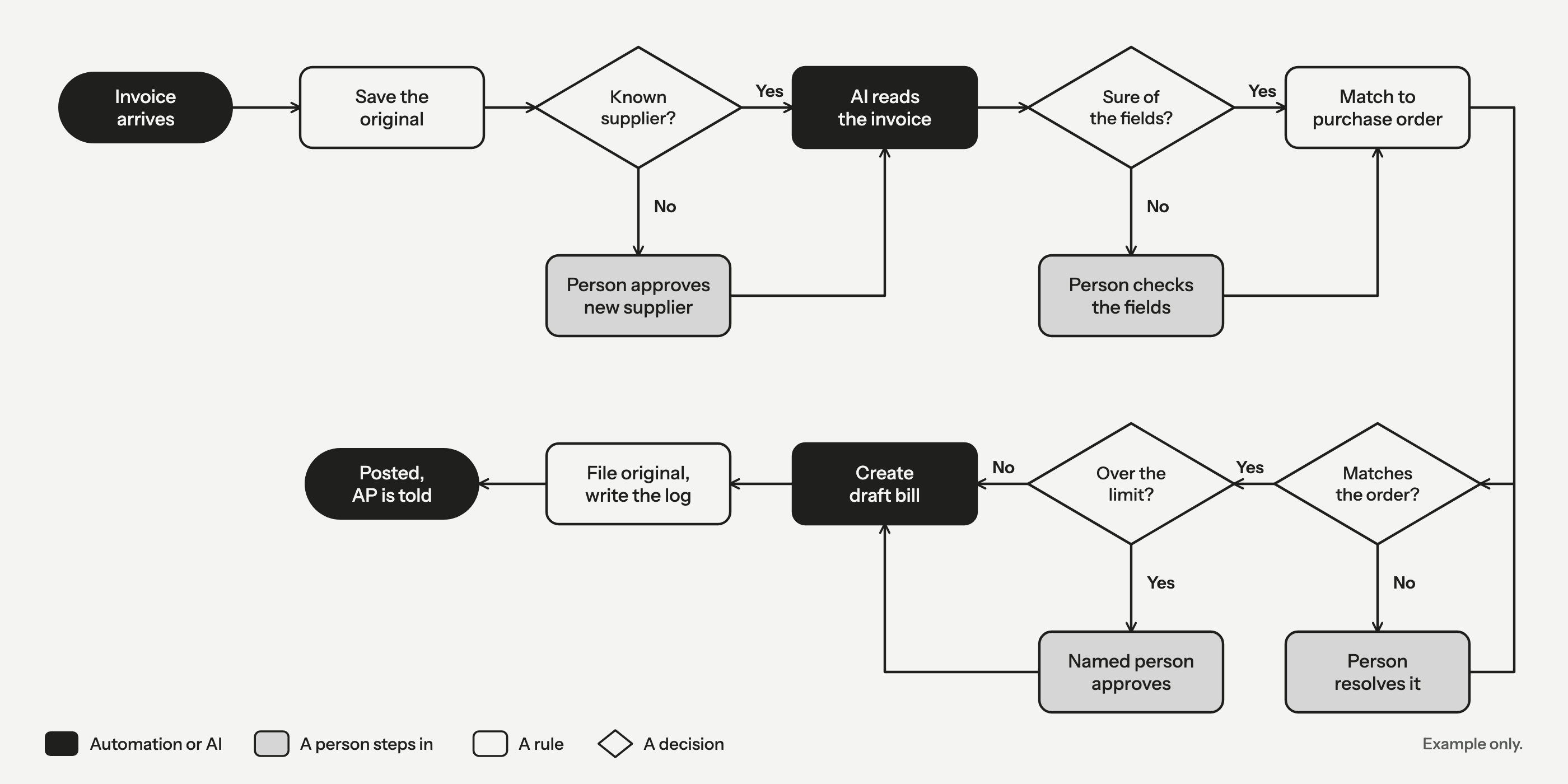
Small, reversible actions can run on their own. Anything that moves money, changes a customer record or cannot be undone waits for a person. Before a workflow goes live we write down what it may do alone, and what happens when it fails: it retries first, then a named person gets the item with the context attached, and every step is logged.

We scope access, hosting, model providers, retention and human approvals around the sensitivity of each workflow.

Each workflow gets its own credentials, kept separate for each client, and can reach only the systems it needs.
We host in a Canadian region where practical, and use a dedicated deployment for more sensitive work.
The model behind a workflow can change as prices and quality move. You are not tied to one provider.
We agree what is stored, and for how long, for each workflow rather than leaving it to defaults.
We keep a plain list of the providers (subprocessors) that handle your data and what each one does with it.
It runs under your accounts and credentials, and we hand it over with documentation so you can run it without us. Managed operations is optional.
We never use your data to train AI models.
We follow Canadian privacy and compliance rules, including PIPEDA and provincial privacy laws where they apply.
Every project is scoped to your case and agreed in writing first, so you can set the cost against the hours it saves before you commit to anything.
We observe the process and baseline it: time, steps, systems, volume and errors. We check the technical side and give you a fixed written scope.
One workflow, built and tested against real examples, piloted with a person in the loop, then put into production with training and a written guide.
We watch it, repair it when connected software changes, adjust it as your business does, and report on what it is doing. Optional, and where the next workflow starts.
A free 30-minute call. We will tell you plainly whether automation is worth it for your workflow. How pricing works
Short, practical writing on how automations are designed, tested and kept running.
Delivery · 5 min read
Every automation works in the demo. The ones worth paying for are designed around the day an invoice arrives as a blurry photo or a connected system changes overnight.
Knowledge assistants · 6 min read
A general chatbot answers from what it learned in training. A knowledge assistant answers from your documents. The difference decides whether you can trust it.
Warehouse operations · 5 min read
A delivery arrives with a purchase order, a packing slip and an invoice that do not quite agree. Most of the matching is plain rules. AI belongs only where the paperwork is messy.
Something we have not covered? Ask on the call.


